次のコードは、A列から "Baseball" という値を探し、その値の位置に対応する B 列の値をメッセージボックスで表示するマクロである。
以下の空欄に入る適切な語句を選択しなさい。
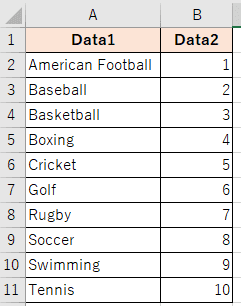
Sub Exam1()
Dim searchValue As String
Dim result As Variant
searchValue = "Baseball"
result = WorksheetFunction.Match(searchValue, Range("A2:A11"), 0)
If IsNumeric(result) Then
MsgBox searchValue & " は" & result & " 行目にあり、対応する値は " & WorksheetFunction.(Range("B2:B11"), result) & " です。"
Else
MsgBox searchValue & "は見つかりませんでした。"
End If
End Sub

 Excel VBA スタンダード 模擬問題 模擬試験